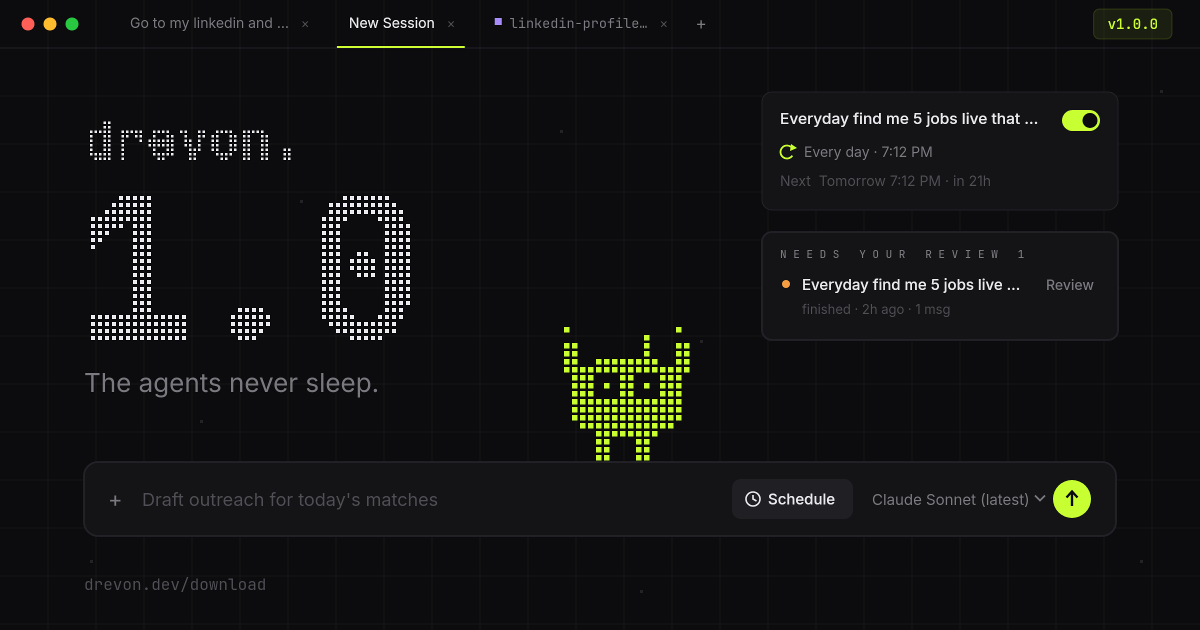
Drevon 1.0 is here
This is the biggest release in Drevon's history, and it earns the version number.
Until today, Drevon waited for you. You opened an agent, gave it a task, watched it finish, and repeated. In 1.0, your agents run in parallel, start on a schedule you set, do their own research on the real web, and notify you when they need a decision.
Run everything at once
Sessions now run in parallel. Start a task with one agent, open a new tab, and start another. Every session keeps working in the background while you look elsewhere, and when you click back in, the full conversation is there, streaming live, with nothing missing.
You no longer wait for one agent to finish before the next one starts.
Put your agents on a schedule
You can now schedule work to run on its own. Tell an agent to run a task every morning, every hour, or at a specific time, then close the popover and move on. Drevon starts the run at the right moment, even if you're busy in another session.
If an agent is busy when its scheduled time arrives, the run queues up and fires as soon as the agent is free. Scheduled work never silently disappears.
Meet the Desk
Drevon has a new home screen. The Desk greets you when you open the app. Start a session with any agent right from the front door, see what's scheduled and what's running at a glance, and follow live activity without opening a single tab.
Your agents can use the web now
Agents in Drevon 1.0 can browse the real web, in your real Chrome, signed in to your accounts. Drevon opens one tidy managed browser window, gives each session its own labeled tab, and cleans up after itself when the work is done.
Two details we spent a lot of time on:
- It never steals your screen. Agents browse quietly in the background. No windows popping up over your work, no stolen focus while you type.
- Your logins just work. Agents can read the docs, dashboards, and tools you already have access to, without you copy-pasting anything.
Drevon finds you when it matters
When an agent finishes something or needs your review, you'll know, even if you're in a different session or a different app entirely. Drevon 1.0 adds review notices inside the app and desktop notifications outside it. Proactive agents only make sense if you don't have to watch them. Now you don't.
A new look, and a new face
The entire app has been redesigned around a flat, quiet, precisely aligned interface: one-color chrome, a cleaner sidebar that puts your sessions first, and settings that open as a proper full page instead of a cramped dialog.
There's also someone new living in it. The Drevon mascot is a tiny pixel character that hangs out on your Desk and perches on the composer. It's more than decoration: it paces while your agent works, stops and waves when something needs your review, and celebrates a job well done. One glance tells you how your agents are doing.
Fixes worth knowing about
A major release is also a pile of small things done right:
- No more surprise logouts. Routine token expiry no longer signs you out of Claude. Sessions refresh the way they should.
- Errors that explain themselves. If the operating system blocks Drevon from a folder, you get a plain-English explanation of what to allow and where, not a cryptic code.
- Tidier output. Every session keeps its files in its own output folder, so parallel runs never trip over each other.
- Honest status. A session you stop yourself is no longer labeled a failure, and error flags clear once you've actually seen them.
Get Drevon 1.0
Drevon updates automatically in the background. Relaunch the app and you're on 1.0, or download it fresh at drevon.dev/download.